Geometry Dash has stayed near the top of mobile rhythm-platformers for over a decade, and its brutal difficulty curve is exactly why. Every jump, flip, and wave-mode dash syncs to the beat, and one mistimed tap sends you right back to the start of the level. If grinding for currency to unlock new icons and colors is slowing down your progress, the Geometry Dash MOD APK unlocks everything from the start. This guide also clears up some confusion a lot of players searching for this game actually type “dashmetry” by mistake, so if that’s how you got here, you’re in the right place.
Geometry Dash APK Quick Info
| Detail | Information |
|---|---|
| App Name | Geometry Dash |
| Developer | RobTop Games (Robert Topala) |
| Category | Arcade / Rhythm Platformer |
| MOD Features | Unlimited Currency, All Icons Unlocked, No Ads |
| Latest Version | 2.2.147 |
| Size | ~90–150MB (varies by version) |
| Android Requirement | Android 5.0 and up |
| Price | Free (MOD) / Original has a paid full version |
| Play Store | Play Store |
Table of Contents
What Is Geometry Dash APK, Really?
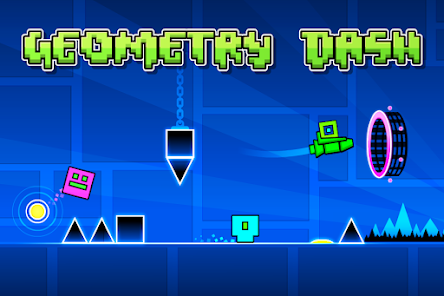
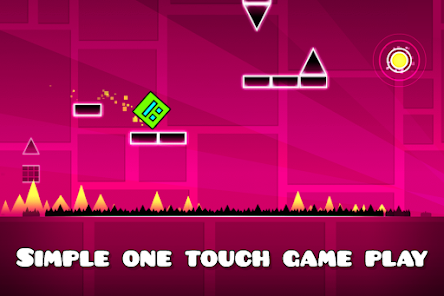
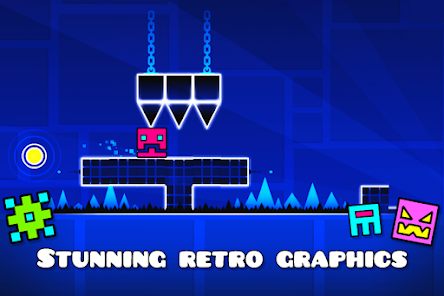
At its core, Geometry Dash APK is deceptively simple: guide a square (or a ship, ball, UFO, or wave, depending on the level) through a side-scrolling obstacle course, timed perfectly to the level’s soundtrack. What makes it genuinely difficult is that a single mistake one early jump, one late flip sends you back to the very beginning of the level, no checkpoints in the base game. That “one more try” loop, combined with a legitimately great soundtrack for each stage, is exactly why it’s held onto its audience for over ten years.
Beyond the official levels, the built-in level editor lets players design and publish their own stages, and the community has built an enormous library of user-made levels some of which are notoriously harder than anything RobTop has officially released.
Understanding the Currency System
One thing most download pages gloss over is that Geometry Dash actually runs on three separate currencies, not just one:
- Mana Orbs — used to purchase basic items in the shop.
- Diamonds — the key currency for unlocking achievements and opening the Vault of Secrets and secret shop.
- Shards of Power — used to unlock special fields and secret islands.
The MOD APK typically unlocks all three simultaneously, rather than just inflating a single currency which matters, since some cosmetic items and secret areas specifically require Diamonds or Shards rather than Mana Orbs.
What Does the Geometry Dash MOD APK Unlock?
- Unlimited Currency — Mana Orbs, Diamonds, and Shards of Power all available without grinding levels.
- All Icons and Colors Unlocked — Every cube, ship, ball, UFO, wave trail, and color scheme available immediately, including ones normally locked behind achievements.
- Secret Level and Vault Access — Skip the usual requirement of finding keys or completing specific challenges to unlock hidden content.
- No Ads — Uninterrupted runs without interruptions between attempts.
Game Modes and Movement Types
Part of what keeps Geometry Dash fresh across hundreds of levels is that you’re not always controlling the same shape:
- Cube — The classic jump-and-land gameplay most players associate with the series.
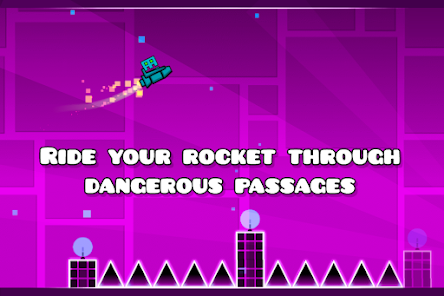
- Ship — Hold to fly upward, release to fall, similar to a side-scrolling flight controller.
- Ball — Tap to flip gravity, rolling along the ceiling or floor depending on timing.
- UFO — Short, precise taps for controlled hops through tight gaps.
- Wave — A diagonal line that moves at sharp angles based on your input, widely considered the hardest mode to master.
- Robot and Spider — Later additions with their own distinct jump and dash mechanics.
Most levels mix several of these modes together, which is a big part of why timing failures feel different depending on which section of a level you’re stuck on.
Understanding Level Difficulty Ratings
Every level in Geometry Dash carries a difficulty rating, and understanding this system helps you pick levels that actually match your skill instead of getting demoralized by something way above your current level:
- Easy, Normal, Hard — Suitable for newer players still learning basic timing and mode transitions.
- Harder, Insane — Requires consistent timing and familiarity with faster-paced sections.
- Demon — The top tier, further split into Easy, Medium, Hard, Insane, and Extreme Demon sub-ratings. Extreme Demons are community-legendary for a reason — some take skilled players hundreds or even thousands of attempts to complete.
The MOD APK’s unlocked currency and icons have zero effect on any of this a Demon-rated level is exactly as brutal whether you’re playing with every icon unlocked or the default cube skin.
Tips for Actually Getting Better
- Practice Mode is your best friend. It places checkpoints throughout the level so you can drill specific tricky sections without replaying the entire thing from scratch every time.
- Memorize patterns, don’t just react. Past a certain difficulty, levels move too fast for pure reflexes — top players have effectively memorized the timing of upcoming obstacles before they arrive.
- Use headphones. The rhythm-sync design means audio cues often line up with upcoming obstacles; playing without sound makes hard levels noticeably harder than they need to be.
- Lower your device’s touch latency if possible. Some Android devices have noticeably more input lag than others, which matters enormously in a game built entirely around frame-perfect timing.
- Don’t skip the tutorial modes for Robot and Spider. These later-added movement types behave differently enough from the classic cube jump that skipping practice on them will cost you on levels that lean heavily on those sections.
Custom Levels and the Community Scene
One of Geometry Dash’s biggest strengths, often undersold by download pages focused purely on the MOD features, is its community level-building scene. Players have used the built-in editor to create everything from faithful recreations of other games to levels so mechanically complex they function more like intricate machines than platformer stages. Some of the most famous community levels have taken their creators literal years to build, layer by layer, syncing every visual element to specific musical beats.
Browsing and downloading community levels works the same in the MOD version as the official release, so unlocking icons and currency doesn’t limit your access to this side of the game at all — you’re free to explore thousands of user-made stages ranging from beginner-friendly to borderline unplayable.
How to Install It
- Enable Unknown Sources — go to Settings > Security > Install Unknown Apps and allow your browser or file manager.
- Download Geometry Dash using the link on this page.
- Check the file size against the table above; a drastically smaller file usually means an incomplete download.
- Install and launch, letting the game fully load before jumping into your first level.
If updating from a previous MOD version: Install the new APK directly over your existing installation instead of uninstalling first — this preserves your saved progress and unlocked content, since progress in most modded builds isn’t tied to an online account.
Troubleshooting:
- Install fails → confirm Android 5.0+ and re-download if the file seems incomplete.
- Levels lag or stutter → lower the graphics quality in settings; some custom community levels are graphically demanding.
- Audio out of sync → this occasionally happens on lower-end devices; restarting the level usually resolves it.
Is It Safe to Download Dash Metry APK?
Since this is a modified file from outside the Play Store, a few precautions help:
- Scan the downloaded file with antivirus software before installing.
- Be skeptical of any site offering a “Mega Hack account” via WhatsApp or similar direct-contact schemes — legitimate MOD APK downloads don’t require you to message anyone to get the file.
- Only grant permissions the app actually needs; a rhythm platformer has no real reason to request contacts or SMS access.
- Understand that “safe” claims on download pages usually mean the file was scanned for obvious malware, not that it’s officially verified by RobTop Games — no third-party site can offer that kind of verification for someone else’s app.
Geometry Dash MOD vs. Original
| Feature | Original | MOD APK |
|---|---|---|
| Mana Orbs / Diamonds / Shards | Earned through gameplay | Unlimited from the start |
| Icons & Colors | Unlocked via achievements | All unlocked instantly |
| Secret Levels/Vault | Requires keys/challenges | Immediately accessible |
| Ads | Present in free version | Removed |
| Level Difficulty | Unchanged | Unchanged |
| Custom Level Editor | Fully available | Fully available |
Worth noting: unlocking every icon and currency doesn’t make the levels themselves any easier. Geometry Dash’s difficulty comes entirely from timing and level design, not from anything currency can buy the MOD just removes the cosmetic grind.
Frequently Asked Questions
Is Geometry Dash MOD APK free?
Yes, Geometry Dash MOD APK completely free.
Do I need root access to install it?
No, root isn’t required.
I searched “dashmetry” — is this the same game?
Yes — “dashmetry” is a common misspelling of Geometry Dash that a lot of players type by mistake. You’re in the right place.
Can I play custom community levels with the MOD version?
Yes, the level browser and custom level downloads generally work the same as in the official version.
Will unlocking everything make hard levels easier?
No — the MOD unlocks cosmetics and currency, not level difficulty. Beating a Demon-rated level still comes down entirely to your timing and practice.
Can I create and publish my own levels with the MOD APK?
Yes, the level editor is typically fully functional in modded builds, since it’s a core part of the base game rather than a premium feature.
Will I lose progress if I update to a newer MOD version later?
Only if you uninstall first. Installing the update directly over your current version preserves your save data.
What does “Demon” difficulty actually mean?
It’s the highest difficulty tier in the game, further broken into sub-ranks from Easy Demon up to Extreme Demon the latter being levels so demanding that even skilled players often need hundreds of attempts to finish one.
Does Practice Mode work in the MOD version?
Yes, Practice Mode with checkpoints is a core gameplay feature, not a premium unlock, so it works exactly the same as in the official release.
Why do some levels feel impossible even with everything unlocked?
Because difficulty in Geometry Dash comes entirely from timing, pattern memorization, and level design none of which currency or unlocked icons can help with. It’s a skill-based game at its core, not a progression-based one.
Final Thoughts
Geometry Dash has earned its staying power through pure, unforgiving timing-based gameplay backed by a soundtrack that somehow never gets old, even after your hundredth attempt at the same level. The MOD APK strips away the currency grind so you can unlock every icon and color from the start, but the actual challenge surviving each level’s relentless obstacle course — is exactly as demanding as it’s always been. Download it, pick your favorite icon, and see how far you get.